
Dental CBCT Viewer: Έτοιμο το ένατο module του Free Surgical Planner.

Σήμερα, 19 Σεπτεμβρίου, ανήμερα της Παγκόσμιας Ημέρας Ελευθερίας Λογισμικού (Software Freedom Day – SFD), παρουσιάζουμε τη νέα έκδοση του Free Surgical Planner (v1.3.0), η οποία ενσωματώνει το νέο module “Dental CBCT Viewer” για τη μελέτη, την καταγραφή και αποθήκευση των εικόνων της υπολογιστικής τομογραφίας κωνικής δέσμης.

Αυτός ο viewer λειτουργεί σε μια αυτόνομη διεπαφή, σχεδιασμένη από κλινικό για κλινικούς, προσφέροντας μια λιτή, αλλά περιεκτική ροή εργασίας, απαλλαγμένη από περίπλοκα μενού και ψηφιακά εργαλεία με τη φιλοσοφία του σταθερή στον ανοικτό πηγαίο κώδικα, την ελεύθερη χρήση, τροποποίηση και διανομή.

Μπορείτε να κατεβάσετε το “Dental CBCT Viewer” με δύο τρόπους. Κάθε επιλογή κατεβαίνει σε διαφορετικό αρχείο.

Επιλογή 1 (προτείνεται): Ενσωματωμένο στη νέα έκδοση του Free Surgical Planner (v1.3.0) ως το ένατο module της πλατφόρμας. Υπάρχει δυνατότητα εναλλαγής από το αυτόνομο περιβάλλον εργασίας του “Dental CBCT Viewer” στο πλήρες λειτουργικό περιβάλλον του Free Surgical Planner και του 3D Slicer.

Επιλογή 2: Ως αυτόνομη εφαρμογή που επικεντρώνεται στις δυνατότητες των χαρακτηριστικών του module.

Σύνοψη αλγορίθμου και χαρακτηριστικών:

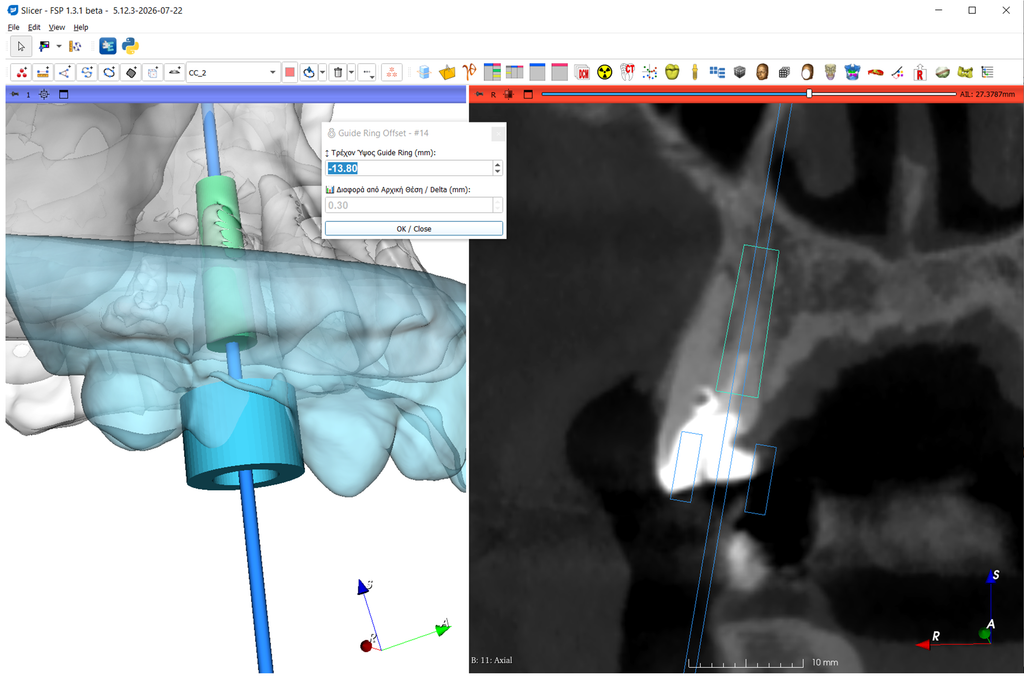
Μετά την εισαγωγή των εξετάσεων CBCT ακολουθεί επεξεργασία σε Layout με τρία παράθυρα:

1. Παράθυρο με 3D απεικόνιση δυναμικά ρυθμιζόμενη για μαλακά και σκληρά μόρια.

2. Παράθυρο με 2D απεικόνιση κάθετη στα σημεία καμπύλης, η οποία σχεδιάζεται στην περιοχή ενδιαφέροντος με δυνατότητα δυναμικής περιστροφής/μετακίνησης και προαιρετική ρύθμιση της απόστασης μεταξύ των σημείων.

3. Παράθυρο με 2D απεικόνιση στο εγκάρσιο επίπεδο, δυναμικά συνδεόμενη με την μετακίνηση του κέρσορα στις κάθετες τομές με απλό πάτημα του Shift.

Κάθε θέση με διαγνωστική αξία αποθηκεύεται είτε με προεπιλεγμένη ονομασία (πχ #14) είτε με ονομασία επιλογής που εισάγει ο χρήστης.

Κατά την επεξεργασία οι θέσεις και μετρήσεις μπορούν είτε να σβήνονται είτε να ανακαλούνται στα παράθυρα και οι τελικά επιλεγμένες θέσεις αποθηκεύονται σε pdf.

Με το “Dental CBCT Viewer” μπορούμε να μελετήσουμε την ανατομία δοντιών και οστών καθώς επίσης τραυματικές ή παθολογικές βλάβες.

Κατεβάστε το αρχείο της επιλογής που θεωρείτε πιο κατάλληλη για την καθημερινή σας κλινική πράξη, δοκιμάστε το module και στείλτε μας τις παρατηρήσεις σας στο info@gnathion.gr για αλλαγές, προσθήκες και βελτιώσεις!


Dental CBCT Viewer: The ninth module of the Free Surgical Planner is ready.

Today, September 19, on Software Freedom Day (SFD), we present the new version of Free Surgical Planner (v1.3.0), which incorporates the new “Dental CBCT Viewer” module for the analysis, recording and storage of Cone Beam Computed Tomography (CBCT) images.

This viewer operates via a standalone interface designed by a clinician for clinicians, offering a streamlined yet comprehensive workflow free from complex menus and digital tools, while remaining committed to the philosophy of open-source code and the freedom to use, modify, and distribute the software.

You can download the “Dental CBCT Viewer” in two ways. Each option downloads a different file.

Option 1 (recommended):
Integrated into the new version of Free Surgical Planner (v1.3.0) as the platform’s ninth module. It allows for switching between the standalone “Dental CBCT Viewer” interface and the full-featured environments of Free Surgical Planner and 3D Slicer.

Option 2:
As a standalone application focusing on the module’s specific features and capabilities.

Algorithm and features summary:

After importing the CBCT scans, processing takes place within a triple layout:

1.
A 3D view, dynamically adjustable for the visualization of soft and hard tissues.
2.
A 2D slice view, showing cross-sections perpendicular to a curve drawn over the area of ​​interest. This view allows for dynamic rotation/translation and optional adjustment of the spacing between points(resample).
3.
A 2D slice view showing the axial plane, dynamically linked to cursor movement within the perpendicular cross-sections (activated by simply holding down the Shift key).

Each location of diagnostic value can be saved either with a default name (e.g., #14) or a custom name entered by the user.

During processing, locations and measurements can be deleted or recalled within the views and finally the selected locations can be saved as a PDF.

The “Dental CBCT Viewer” allows for the analysis of dental and bone anatomy, as well as the assessment of traumatic or pathological lesions.

Download the version best suited to your daily clinical practice, try out the module and send your feedback—including suggestions for changes, additions, or improvements—to info@gnathion.gr.

#FreeSurgicalPlanner #DentalCBCTViewer #DigitalDentistry #GuidedSurgery #Endodontics #CBCTNavigation #Implantology #SlicerFSP #SoftwareFreedomDay


Εδώ, παρακαλώ συμπληρώστε την φόρμα για να κατεβάσετε τη εφαρμογή… Here, please fill out the form to download the application…